Understanding Apple Shortcuts A Little Better
Check out rustcut!
I tried to set my Mac’s battery limit from the CLI and ended up reverse-engineering Apple’s signed container format.
I have been thinking about writing a CLI tool or alias to set my Mac’s battery limit, and was looking through some sources. There are a couple of existing options and tools out there that write battery charge level max values to the System Management Controller (SMC), but a lot of those options seem to have been archived or don’t work anymore due to changes in entitlement enforcement from the kernel (i.e. even the root user is prevented from modifying protected system files).
Full transparency - I have no idea how any of that works yet to any practical degree. Besides, with Tahoe 26.4, Apple introduced a native method to set the battery limit through System Preferences. Coming up with a way to do this idiomatically and safely through a shell could be a great time-saver, especially integrating shortcuts into other scripting.
The trick is, to my knowledge, there isn’t exactly a programmatic interface to change this. However, one can create an Apple shortcut with a new option called ‘Set Battery Charge Limit’. Consistent with the GUI, this only responds to input values of [80, 85, 90, 95, 100]. I went ahead and created a quick shortcut that accomplished this goal:
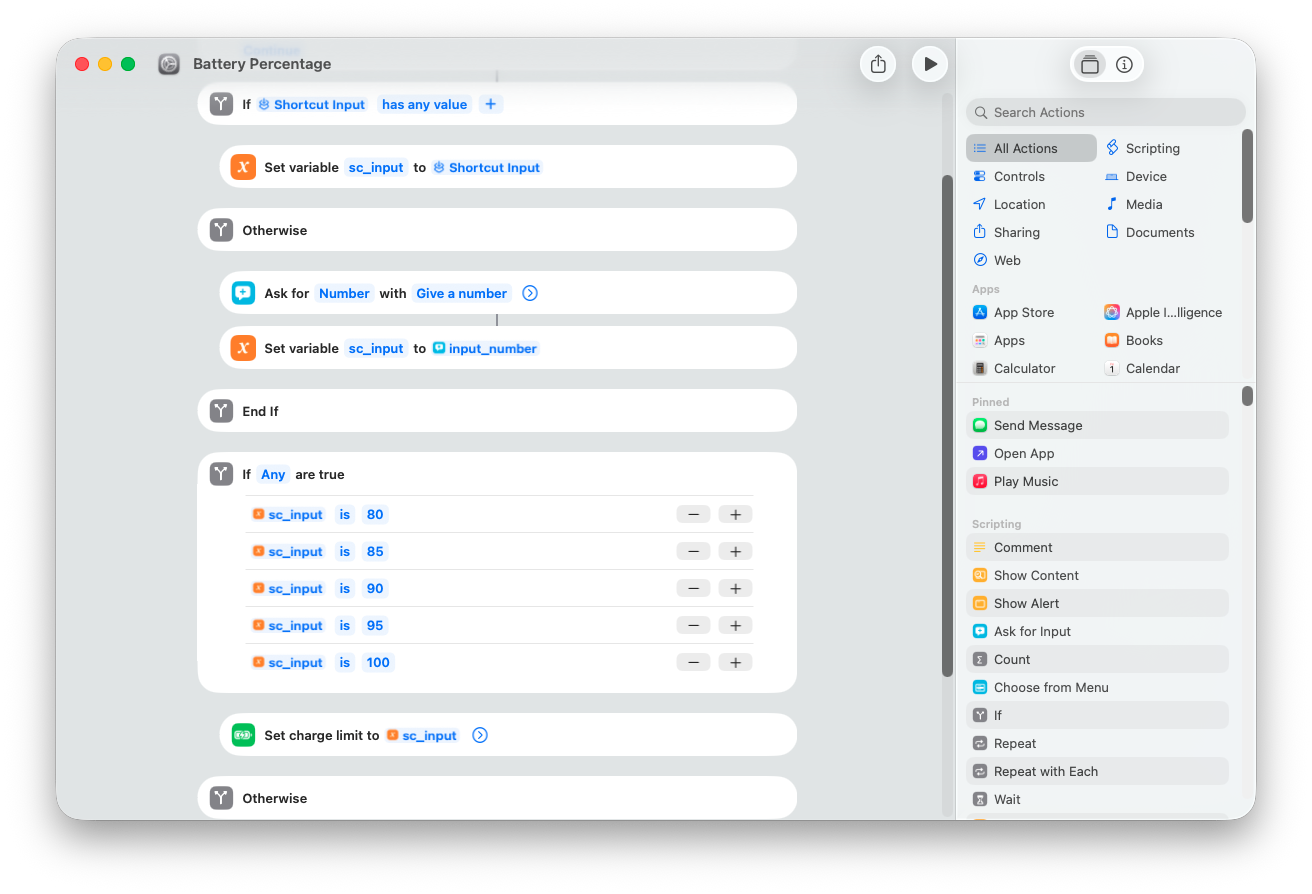
Now, you can surely create these and share them as you wish, but if they’re not shared correctly with others, they normally wouldn’t be able to open them and use them.1
So I went about trying to understand how to demystify these files a bit more - here are some of my findings.
Disclaimer: by no means am I an expert at the following, so feel free to contact me to ask any questions or vibe check my rationale/process if I’m doing something weird.
At first glance, .shortcut files are binary plist files. The natural first attempt to get them to XML:
$ plutil -convert xml1 BatteryPercentage.shortcut -o BatteryPercentage.xmlBatteryPercentage.shortcut: Property List error: Unexpected character A at line 1 / JSON error: JSON text did not start with array or object and option to allow fragments not set. around line 1, column 0.It looks like the file type doesn’t match up. Then what’s the actual type of the file? We can try to find out by using the file command:
file BatteryPercentage.shortcutBatteryPercentage.shortcut: dataHowever, it seems that .shortcut files are not in the normal dataset for file types. So we have to keep looking.
We can check the hex dump of the file to see what we find:
xxd BatteryPercentage.shortcut | head -500000000: 4145 4131 0000 0000 9c08 0000 6270 6c69 AEA1........bpli
00000010: 7374 3030 d101 025f 1017 5369 676e 696e st00..._..Signin
00000020: 6743 6572 7469 6669 6361 7465 4368 6169 gCertificateChaiWe see four bytes: AEA1. Not a plist, not an xml. No wonder plutil was refusing it entirely. We’re looking at an Apple Encrypted Archive (AEA) - a signed container format that wraps an Apple Archive, which in turn contains the actual shortcut binary plist.
We can glean three things from this (source: Apple Wiki):
- At offset
0x04for three bytes we read00 00 00. This corresponds to profile 0, which means the file has no encryption but is signed - At offset
0x08for four bytes we read9c 08 00 00. When read as a little endian uint32 we get0x89c—>2204. In the prologue for an AEA file, these bytes specify the length of the auth data length. - At offset
0x0cfor eight bytes we read bplist00, which indicates the auth data is binary plist data.
We can also immediately see “SigningCertificateChain” in the dump. All in all, this indicates there’s probably a certificate that we want to use to extract the signed Apple Archive. Once we get that Apple Archive file, we can extract the binary plist, then finally we can convert it to readable XML.
Here’s the kicker - the file is “signed,” but the key that verifies the signature ships inside the file. Anyone holding the bytes is also holding the validator. Pull it out, hand it back to aea decrypt, and you’re in.
Stitching this into a python script (for readability):
import plistlib, struct, subprocess

# Read file
with open('BatteryPercentage.shortcut', 'rb') as f:
    data = f.read()

# AEA header: bytes 8-11 hold the metadata length (little-endian uint32)
header_len = struct.unpack('<I', data[8:12])[0]  # = 2204

# Metadata is a binary plist starting at offset 12
metadata = plistlib.loads(data[12:12+header_len])
leaf_cert = bytes(metadata['SigningCertificateChain'][0]) # leaf cert at index 0 of chain

# Write to file.
with open('/tmp/shortcut_leaf.der', 'wb') as f:
    f.write(leaf_cert)

# Convention for cert storage is DER, so need to parse accordingly and extract only the public key information.
subprocess.run(
    ['openssl', 'x509', '-inform', 'DER', '-in', '/tmp/shortcut_leaf.der',
     '-pubkey', '-noout'],
    stdout=open('/tmp/shortcut_pub.pem', 'w')
)
With the above, we get a pem key we can use to “decrypt” the aea file:
aea decrypt \
  -i BatteryPercentage.shortcut \
  -o /tmp/shortcut_payload.aar \
  -sign-pub /tmp/shortcut_pub.pem
Subsequently, we can extract the apple archive and convert to xml using the plist utility:
mkdir -p /tmp/shortcut_extracted
aa extract -i /tmp/shortcut_payload.aar -d /tmp/shortcut_extracted/
plutil -convert xml1 /tmp/shortcut_extracted/Shortcut.wflow -o BatteryPercentage.xmlAt last, we get an XML file that we can start to understand:
<?xml version="1.0" encoding="UTF-8"?>
<!DOCTYPE plist PUBLIC "-//Apple//DTD PLIST 1.0//EN" "http://www.apple.com/DTDs/PropertyList-1.0.dtd">
<plist version="1.0">
<dict>
	<key>WFQuickActionSurfaces</key>
	<array/>
	<key>WFWorkflowActions</key>
	<array>
		<dict>
			<key>WFWorkflowActionIdentifier</key>
			<string>is.workflow.actions.conditional</string>
			<key>WFWorkflowActionParameters</key>
			<dict>
				<key>GroupingIdentifier</key>
				<string>39C44F1E-9F90-43F5-B823-80B96BE7E8C6</string>
				<key>WFCondition</key>
				<integer>100</integer>
... (cut off for length)
This is a great starting place for a few things:
-
Sharing and collaborating on shortcuts, properly. Now
.shortcutis git-friendly. You could diff a shortcut or code review one. Imagine a public registry of community workflows you could fork and re-sign - the same posture we have for Homebrew formulae or VS Code extensions, but for automations that live on your phone. -
Mapping the XML schema. As far as I can tell, the full mapping between XML objects and shortcut actions, operators, and input modes isn’t publicly documented. I’ve worked out a handful by example but most of it is still open territory.
-
Generating workflows programmatically - and eventually agentically. Once Shortcuts are just XML, an LLM can read them, modify them, generate new ones, and ship them back through a
savecommand. The natural next step is an MCP server, which turns Shortcuts from a GUI-bound automation tool into something an agent can author end-to-end. -
Auditing what you actually run. The flip side of trivial signing is that a shortcut someone shares with you is a black box you’re trusting blindly. With the pipeline above, you can read what it does before you run it -
rustcut extractdoubles as a tiny security tool.
To that end, I went ahead and made rustcut2, a Rust CLI that covers three commands so far: extract, save, and run.
Save does the opposite of the extract process (in fewer steps, since once we convert to bplist we can shell out to the existing shortcuts CLI to register it). A --mode flag would be a natural addition, so we could specify contacts or others allowed to view a shortcut.
Run wraps the shortcuts CLI’s run function, which takes the label/title of a saved shortcut and a single input argument. You can pass a file/URL via --input-path, or read text in from stdin - the CLI itself doesn’t parse input, so you pipe it in:
echo "100" | shortcuts run "Battery Percentage"rustcut run "Battery Percentage" 100You could get creative and pass serialized JSON or a delimited string and parse it on the inside, but I’ve yet to actually try that out.
So: AEA —> AAR —> bplist —> XML. Then on the return: XML —> bplist —> Signed to AEA. Rustcut wraps this process and lets you round-trip any shortcut you own (or don’t own, evidently). The schema mapping is still mostly reverse-engineered, the MCP idea is a weekend project waiting to happen, and there’s no shortcut registry or API yet - if any of that sounds fun, the repo is open and I’d love a PR.